Git Is Not Fine
This is a piece about git. But I wrote it because of jj.
The thing about jj is that I’m in love with it. I love it, and I’m convinced that you’ll love it too. I think that if jj doesn’t have any dealbreakers for you, you should give it a serious shot.
But you probably won’t if you think git is fine. And that’s unfortunate, because git is not fine.
See, Git does two jobs: it’s a distributed store for source, and it’s a distributed workflow tool. It knocked the first job out of the park so far that most of us fail to see that its solutions for the second job were mostly an afterthought. And if you actually work in a meaningfully distributed way (and whether you know it or not, you do — across time, with yourself or others) then whether you know it or not you are feeling the pain. Because, like East River Source Control says, async development is table stakes.
Some Throatclearing About Git
If you’re not familiar with git (and you are), git is a distributed version control system, the first DVCS to hit critical mass and practically the only VCS anyone uses anymore. Almost every engineer who knows what a rebase is learned it using git commands, in terms of git constructs. It’s still a little miracle of a tool, too, economical and fast. As a result, most all of us have seen or written little diagrams that look like this (which represents a local feature branch in a steady state):
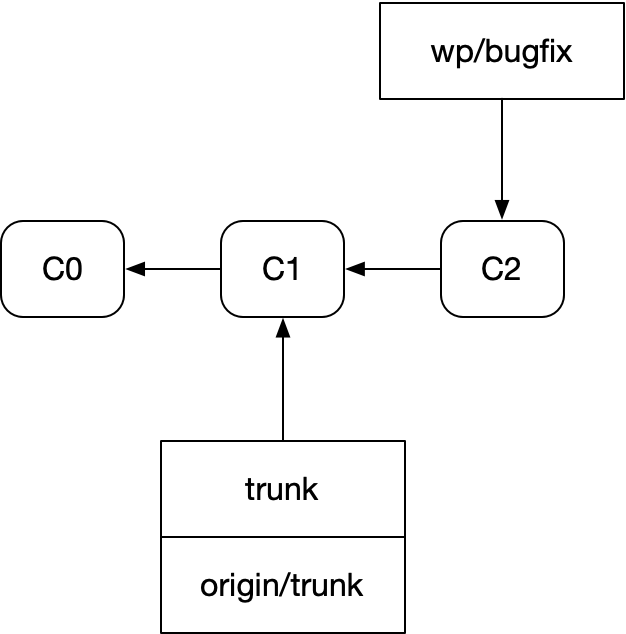
Diagrams like this are the heart of thinking in git: commits and branches. The commits are the source code and its history, and they are immutable. The branches are mutable pointers with a log attached.
Behind these perfect diagrams hide devils, imperfections in git’s model of how we work with code. Let us uncover them.
There is No C
Say you’re collaborating with someone in a faraway time zone. You don’t want to merge anything without getting their review first. How do maintain throughput in the presence of that time zone latency?
The same way CPUs do it: by pipelining your work. Instead of writing a single PR, submitting it, and waiting for it to finish before starting the next one, you write the first PR, submit it, write the second PR on top of it, submit that one, and so on and so forth, submitting many sequential PRs for review simultaneously. Like this:
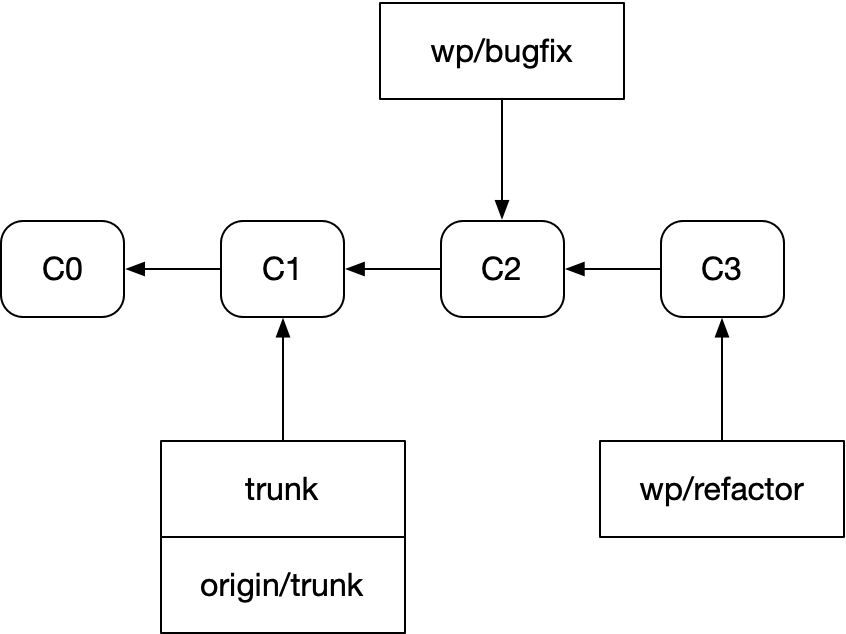
The term of art for this is “stacked PRs”. And unfortunately, git makes stacked PRs very hard to work with.
To see why, let’s look at how a fastforward plus rebase flow is represented in git. Here’s our repo after a fresh fetch:
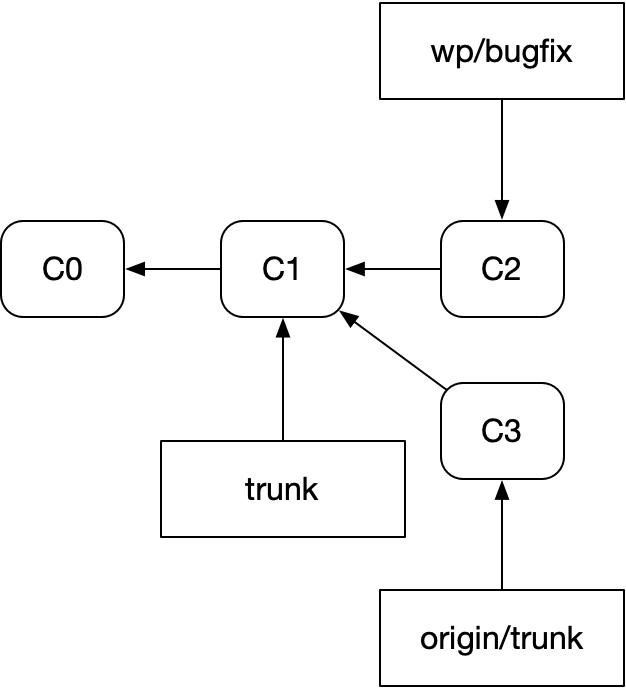
Here’s the same repo after fast-forwarding trunk and rebasing our bugfix branch onto it:
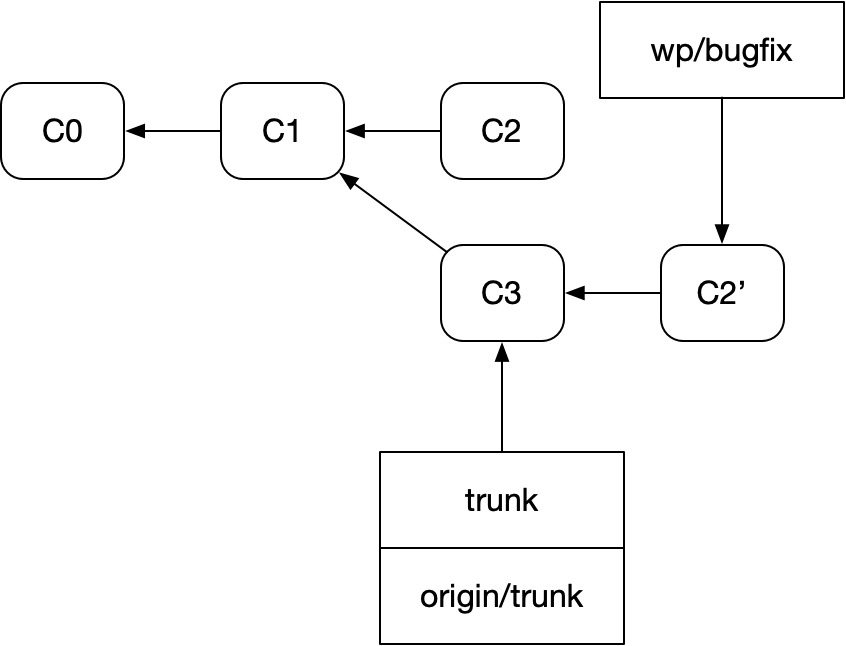
The rebase takes the diff of C2 to C1 and applies it to the new commit we received from origin, C3, creating C2’.
Those relationships are pretty clear in the diagram. That’s why people do the diagrams that way! Pro Git includes diagrams with exactly that shape.
But these commit names are unlike anything you’d find in a real repo. This is closer to reality:
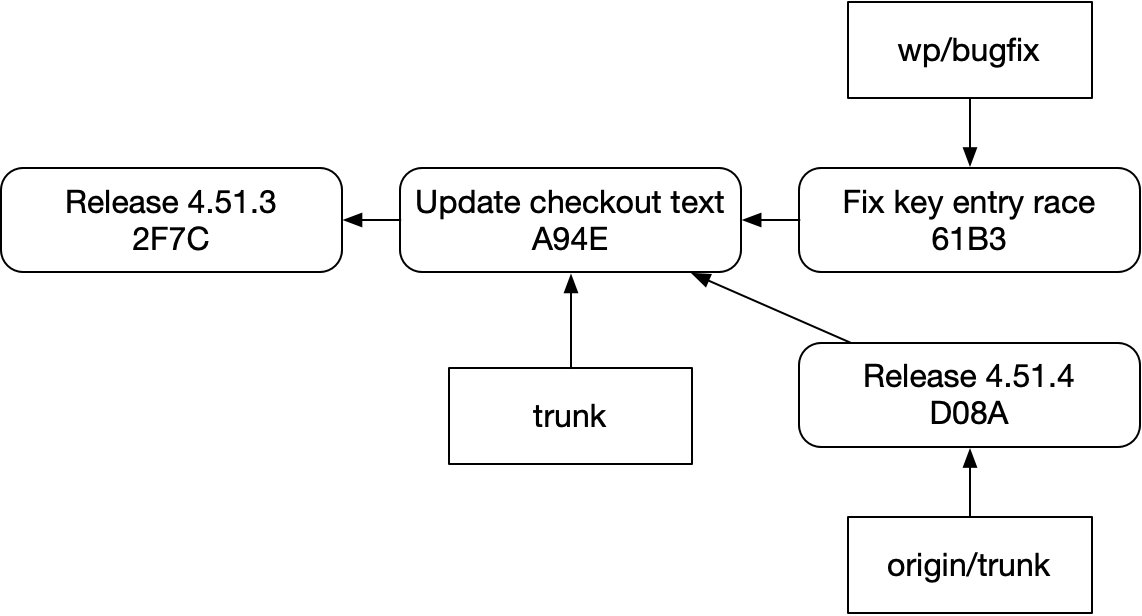
And after you completed the rebase, you’d get something like this:
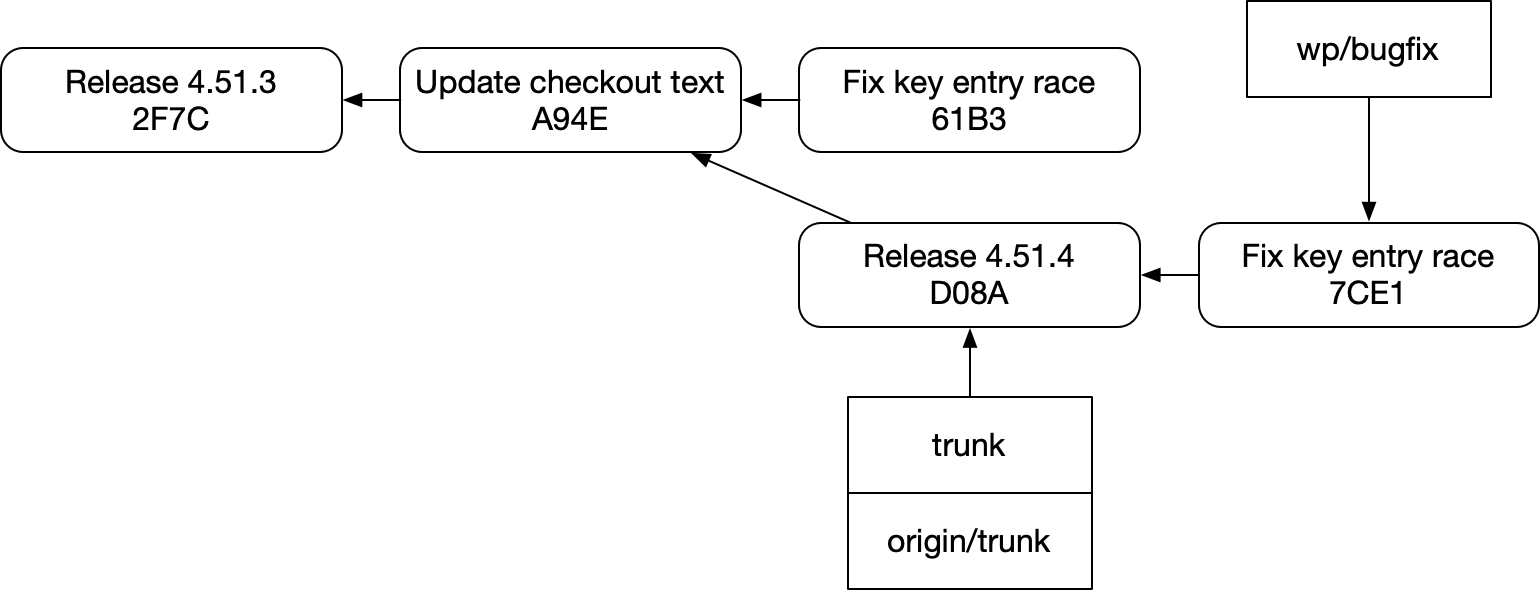
Take a moment to read these diagrams and the previous ones with fresh eyes, taking in what they point to in the underlying system.
You might see then that we’ve lost some important information in the new diagrams. The two “Fix key entry race” commits had an ordered relationship indicated with an apostrophe. But that’s not there in the new diagrams. Git has no knowledge of that relationship, and can’t tell you about it.
The commit names in the old diagram also imply that all the commits named C belong to an ordered series in a branch. You can still visually see that in the new diagram, too, but the arrows tell a different story: actually finding “Release 4.51.4”’s successors in code or with git commands is not trivial in a real repo. You’d have to scan all the branches for commits visible on a path to “Release 4.51.4”.
So when we read classic git diagrams, or even these more detailed git diagrams, the diagrams themselves and sometimes even our own eyeballs are misleading us about the capabilities of our tool. There is no “C2” that you can look for and see various permutations of. There’s not even a “C” linking these commits together. These notions do not exist.
As a result, git commits cannot tell you and have no idea about:
- Successor commits
- Revision history (if you amend a commit, you can’t get to the old one from the new one)
- Rebase history
- Whether they are garbage or not
Branches can’t do it either. They do have a notion of history, but:
- Branches aren’t 1:1 with code changes. They are in some cases, but this is a convention you can’t rely on
- Branches do not have relationships with one another. For example, it’s impossible to reliably find
wp/bugfixfromtrunkin the above example — it’s not even reachable fromtrunk, since there are no forward references.
Got it? Great. Because this is, of course, a discussion of stacked PRs. (Remember?)
Let’s go back to that example. Say we write a successor PR to our bugfix:
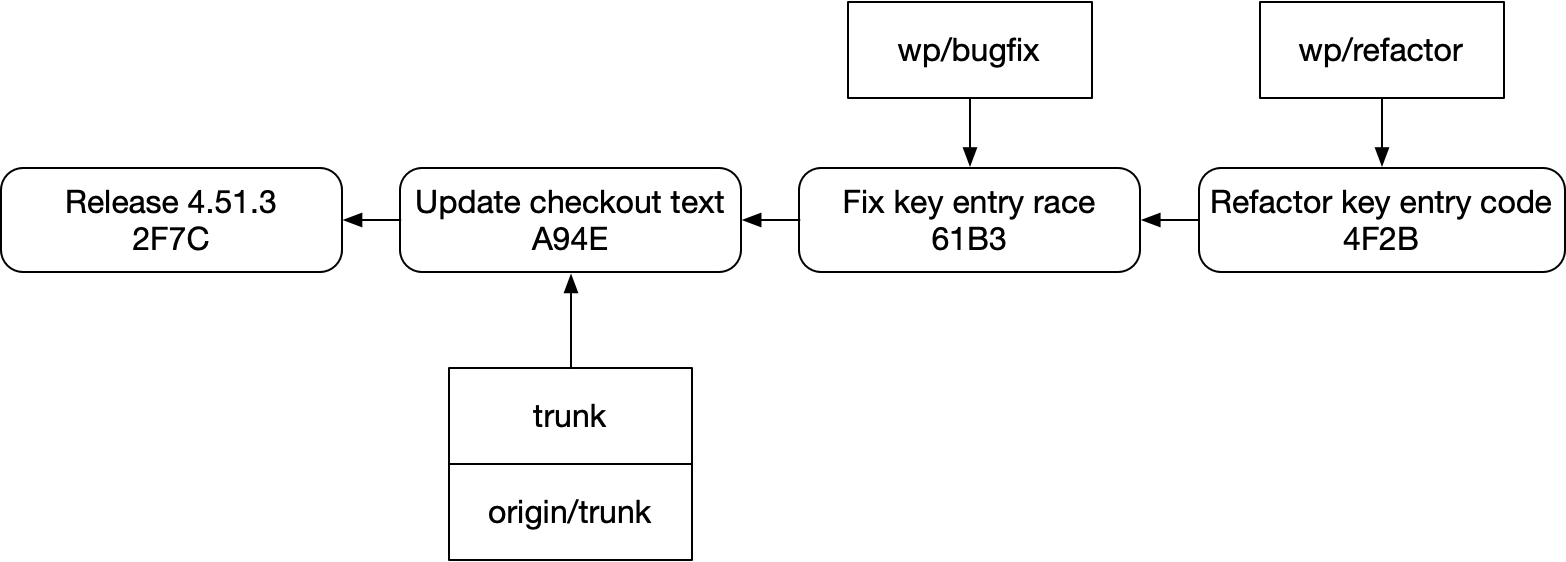
And then we fetch and update trunk:
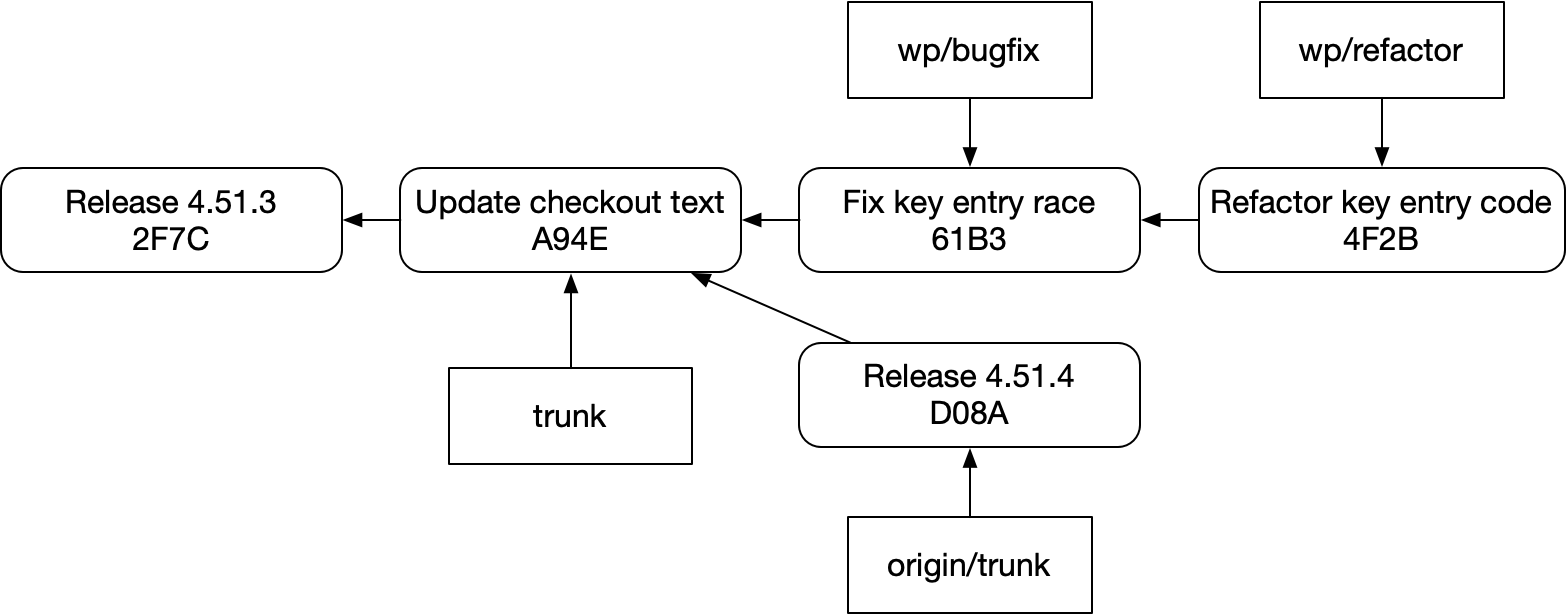
How do we succinctly and reliably rebase that while preserving our stack, like this:
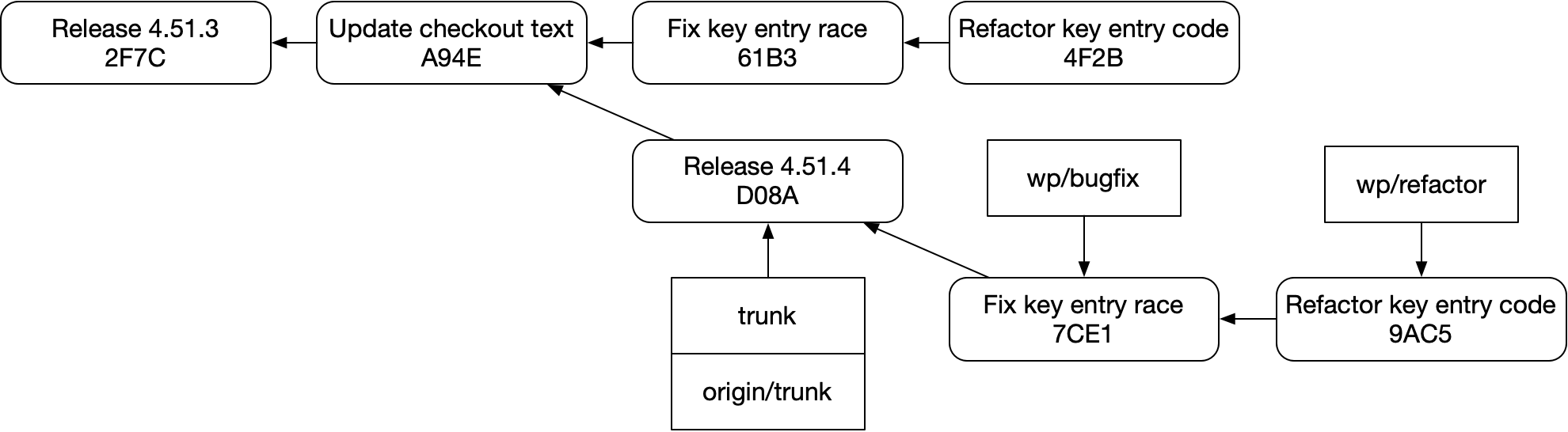
The answer is “not easily”. This structure is fragile in git. It’s easy to accidentally do this instead::
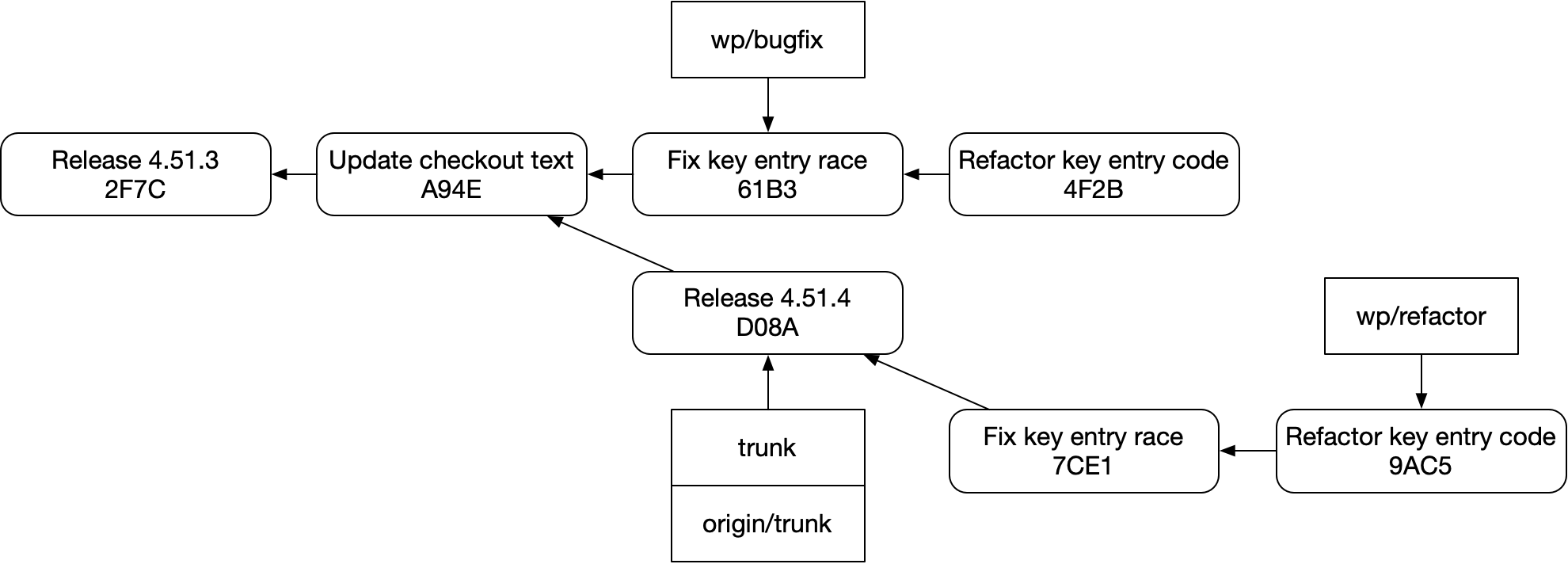
Or this:
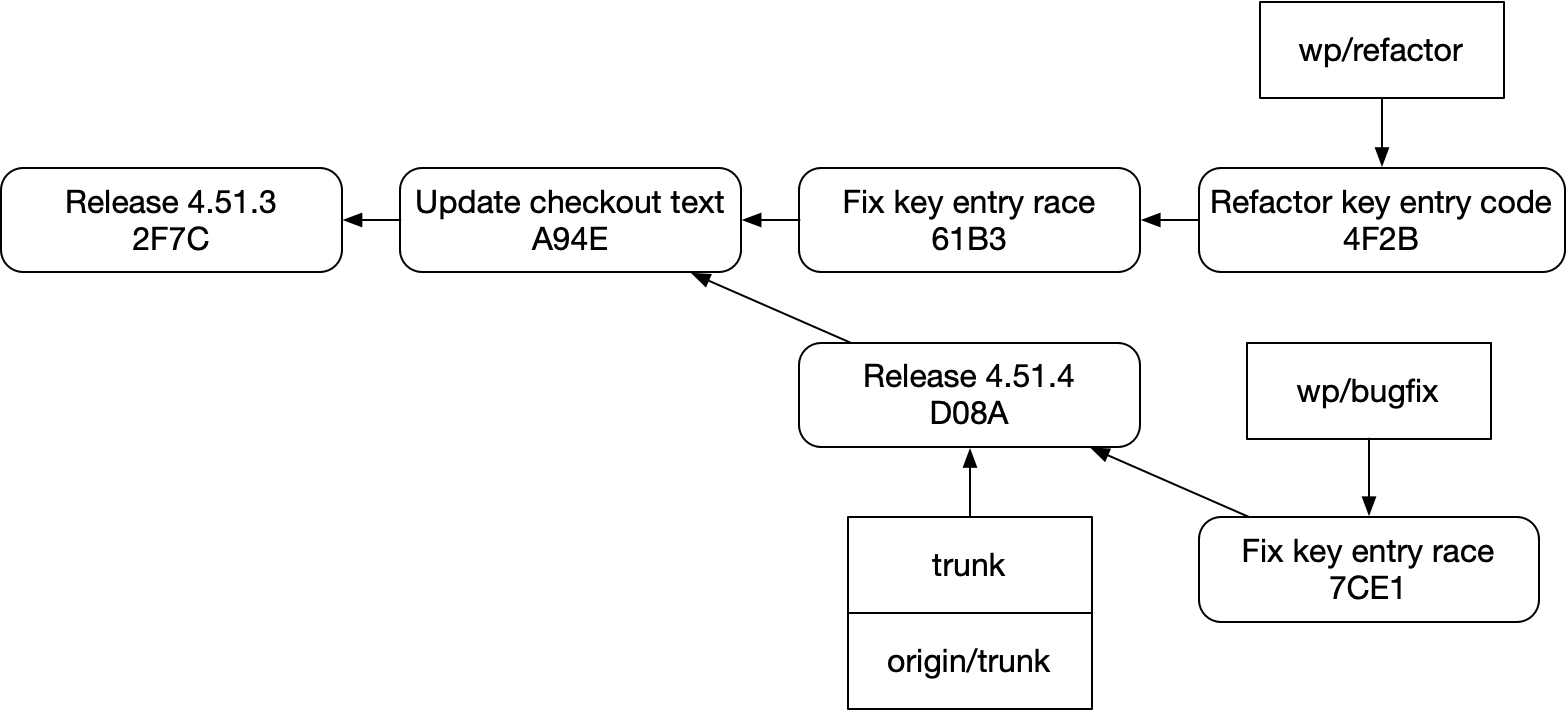
And that’s for a few reasons:
- Since we don’t know anything about successor commits, we can’t easily see
Refactor key entry codefromFix key entry race. - Since commits might be garbage anyway, even if we could see successor commits, they might be out of date
- Branches aren’t helping — they “are” the PRs themselves in a sense, but in this workflow they are easily to accidentally step on
Stacking tools like graphite are able to do this job with git, yes, but not gracefully. They can’t augment branches or commits themselves to fix these shortcomings — they have to build a separate branch metadata store and keep it in sync with git. That store can get out of sync when you interact with git itself.
No Mutability
All of these issues flow downstream from git’s hands-off modeling of mutability. It turns out that mutation is important! (That’s generally what I’ve been paid to do, at least.) So let’s take a look at how git handles it in editing workflows.
Here’s what our bugfix branch would have looked like before we even started working on it:
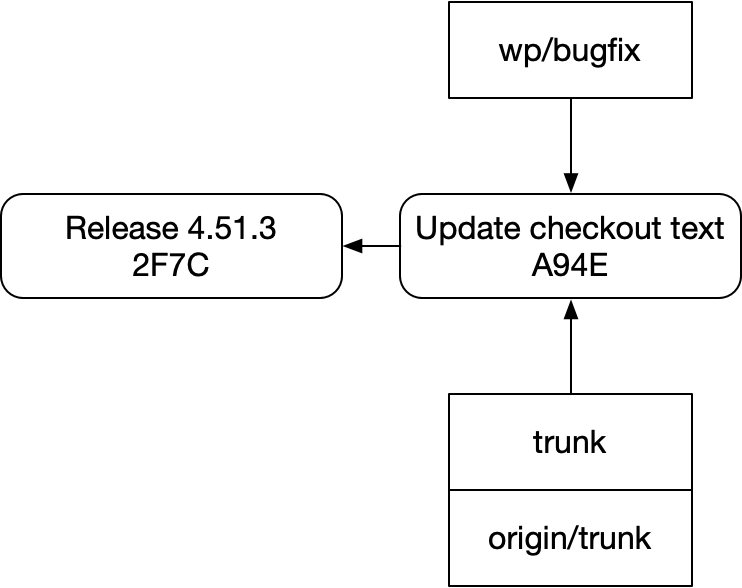
If we add our checkout to the diagram, things get more complicated. Here’s my representation of the mental model git presents you:
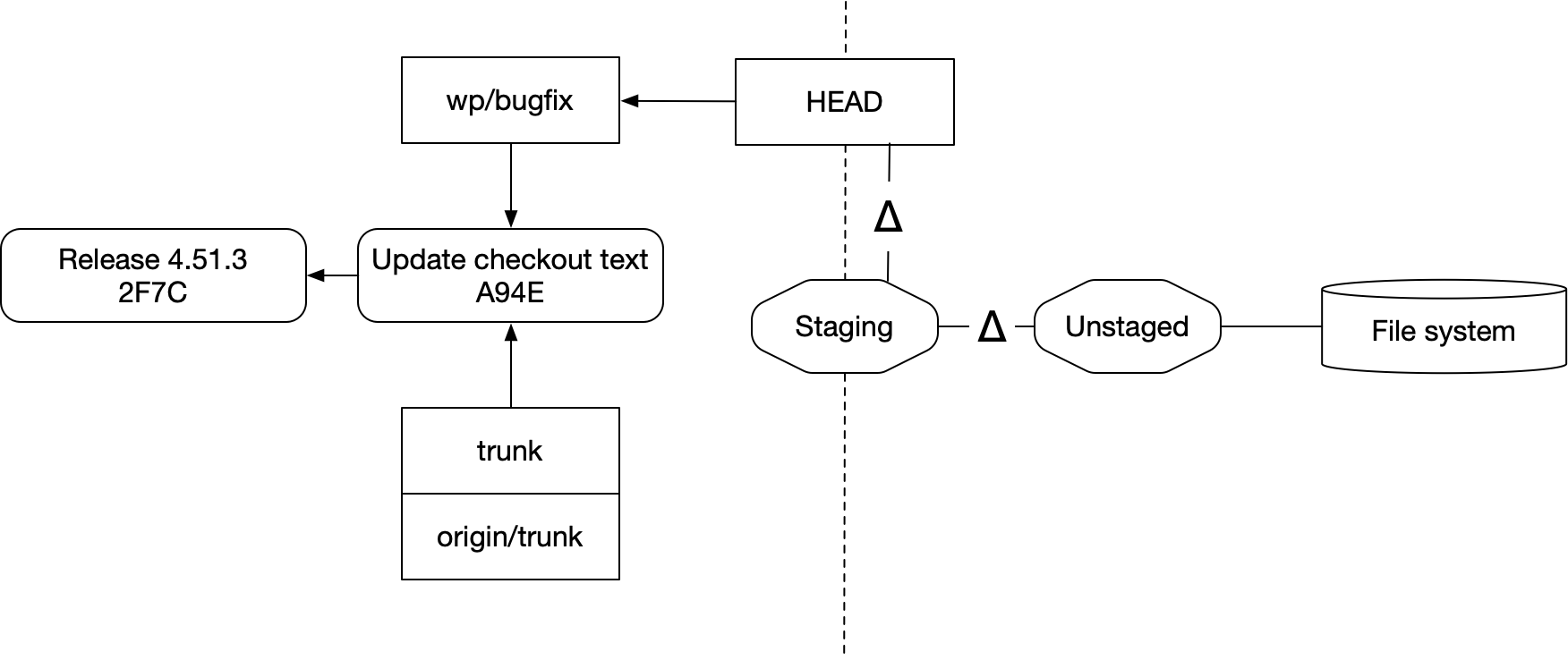
- Staging (or the “index”) is a snapshot of source, usually taken from the working copy. New commits are created from staging. Staging is usually treated like a diff
- Unstaged is a second diff that represents the difference between your index and what’s in the file system
- The file system contains your checkout, modulo whatever changes are in staging and unstaged
- Finally, HEAD is where new commits go
There’s also the stash system, which I won’t cover. It acts as an a separate store for saving and restoring staging and unstaged changes.
All of this exists as a sort of waiting room for your repo: your checkout lives in the filesystem, and any edits you make live in Unstaged until you move them into Staged. From there they can be checked in as a commit, or you can discard them and restore the file system to have the same content as your HEAD branch
If you check out a different commit or branch (moving HEAD to point at a different location), git will try to update your file system to match, taking care to preserve the diffs in Staging or Unstaged:
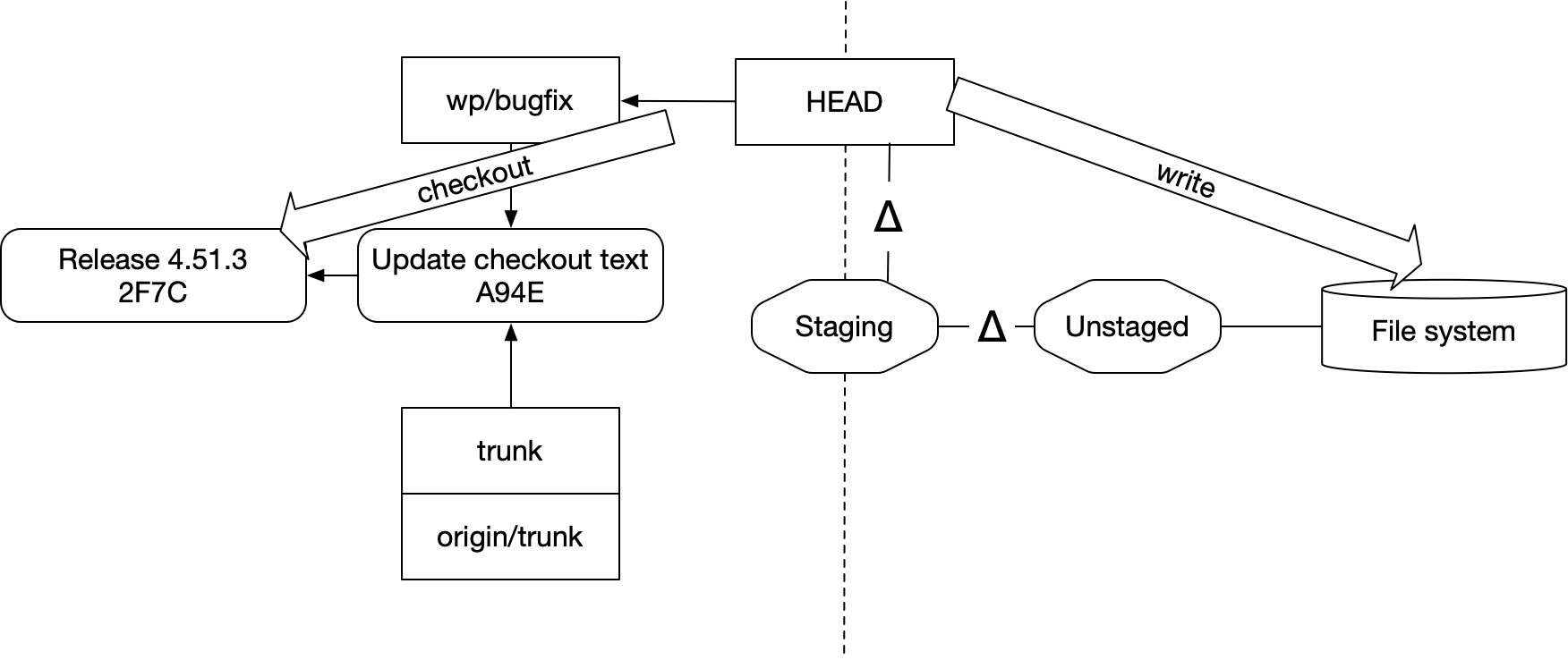
And if that succeeds, it will leave you with this updated relationship:
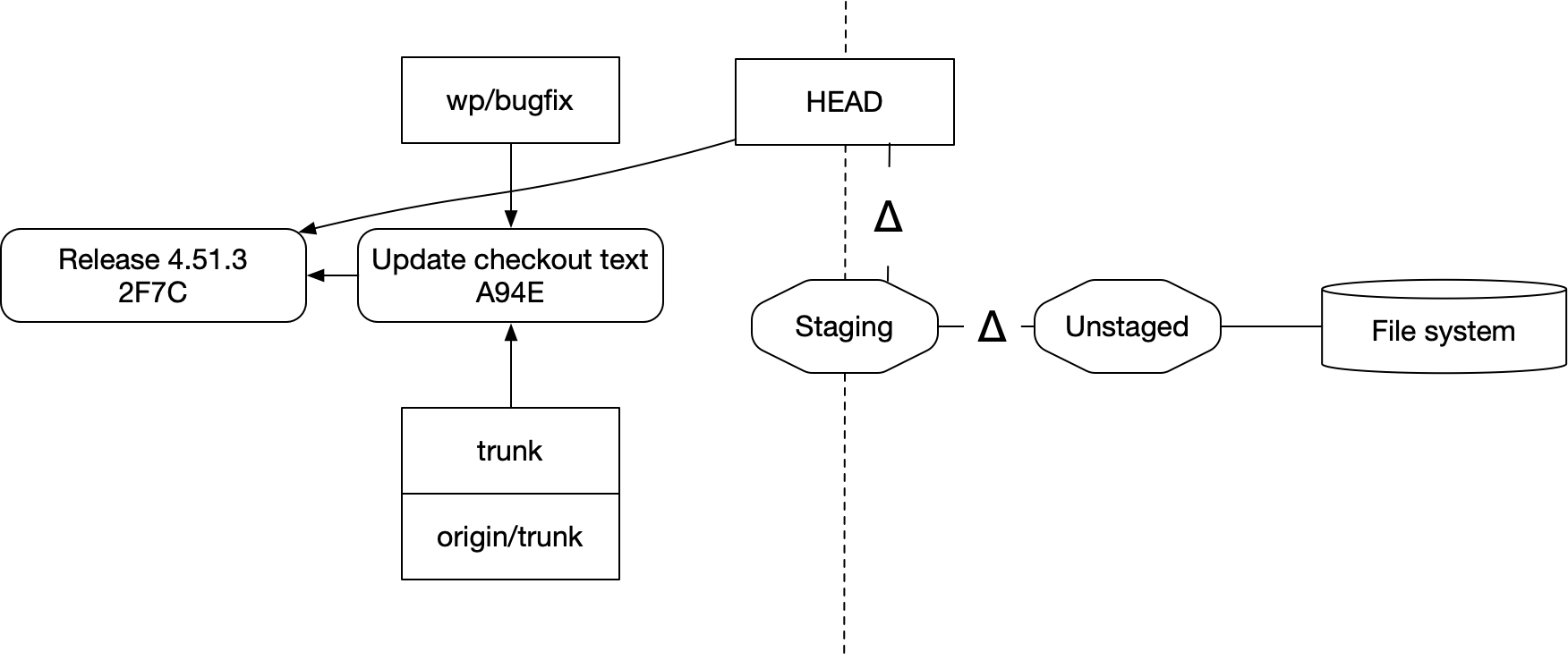
A couple things to note about this:
First, none of your changes ever move to the left side without an explicit command. Probably all of this could be considered “in the repo”: it all lives in your file system, after all. Creating a commit doesn’t back it up or send it across the network for safekeeping. But nothing moves into the well ordered realm of commits and branches without being told to.
And second, this looks like a rebase of Staging onto Release 4.51.3. The commands issued were different from a “left side” rebase and the entities we rebased don’t interoperate with commits, but in terms of how the arrows moved around — it’s a rebase.
Could we actually think of it that way? What if we modeled everything with commits?
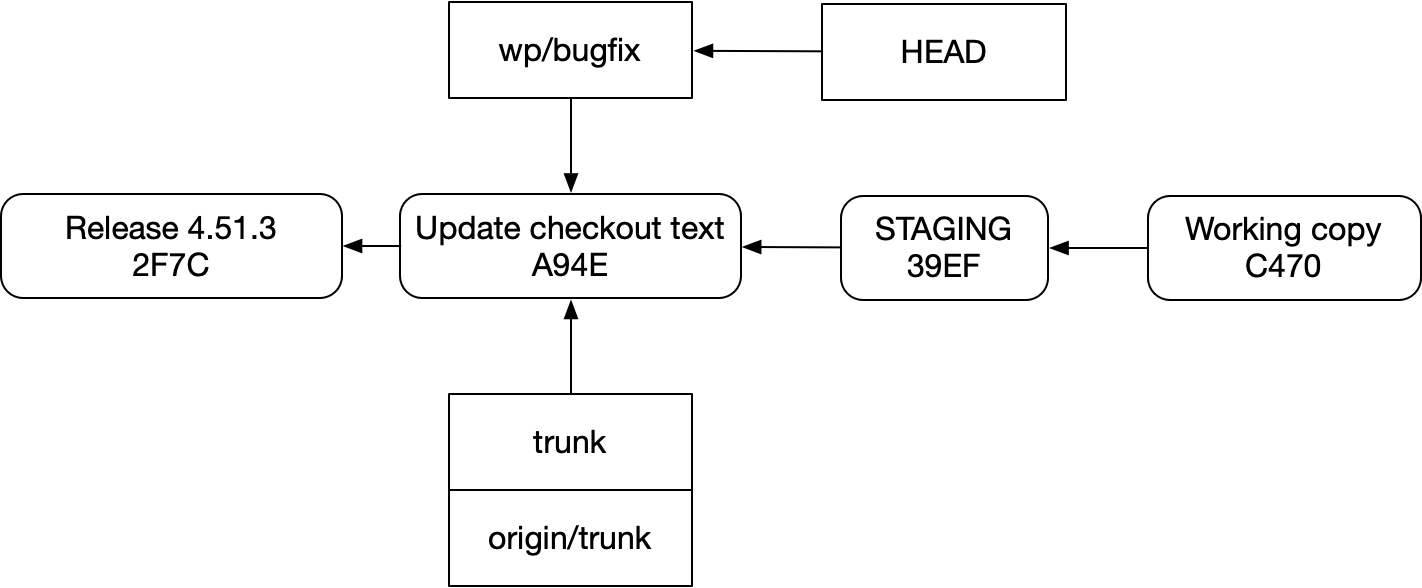
Setting aside how many Swedish fish this idea stuffs into the timing belts of our brains, as well as the many “now draw the rest of the owl” issues with how a system based on the diagram above could possibly work, there’s nothing representationally crazy about it in a steady state. Staging and working copy have clear ancestors that we can point to; they contain source code, just like a regular commit does (albeit living in the file system instead of a little database).
And yet the Swedish fish are there, fish named “mutability”. Commit ids are hashes of their contents. So if they’re mutable, those ids are constantly changing. So how do we have a consistent idea of what staging and the working copy “are”? They have to be branches instead, which have their own issues (which we already covered).
This complexity causes real problems:
- Learning and using git as a whole is harder because everything exists twice
- Exporting is weird because the full state of your repo is much different from what you clone
- Async flows where changesets change over time just don’t work, because the “left side” of the system can’t represent change except through branches. And branches don’t represent changesets
- Your actual workflow sometimes can’t be represented at all, because the mutability half of the system can’t represent merges
And that last one, about not being able to represent your actual workflow? Let’s drill down into that before we finally come up for air and end this thing.
Git Can’t Represent Real Workflows
Let’s say that you have started building a new feature. You’ve created a new branch, but you haven’t committed your work yet. So your repo state is this:
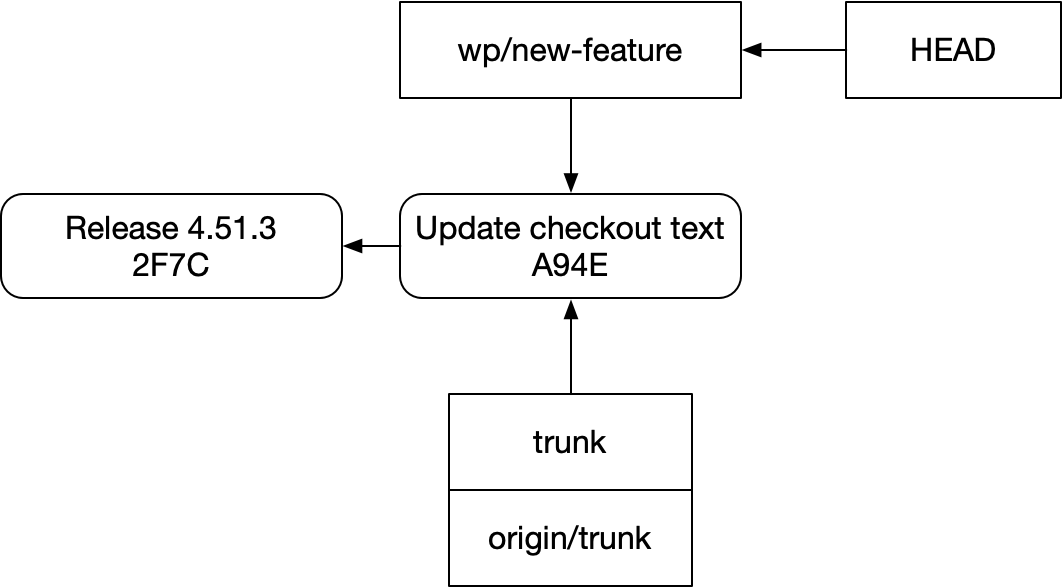
While finishing up this feature on device, you encounter a bug. It doesn’t block the changes, but it’s making development annoying. So you stash your work, switch to a new branch, create a repro test, and fix it:
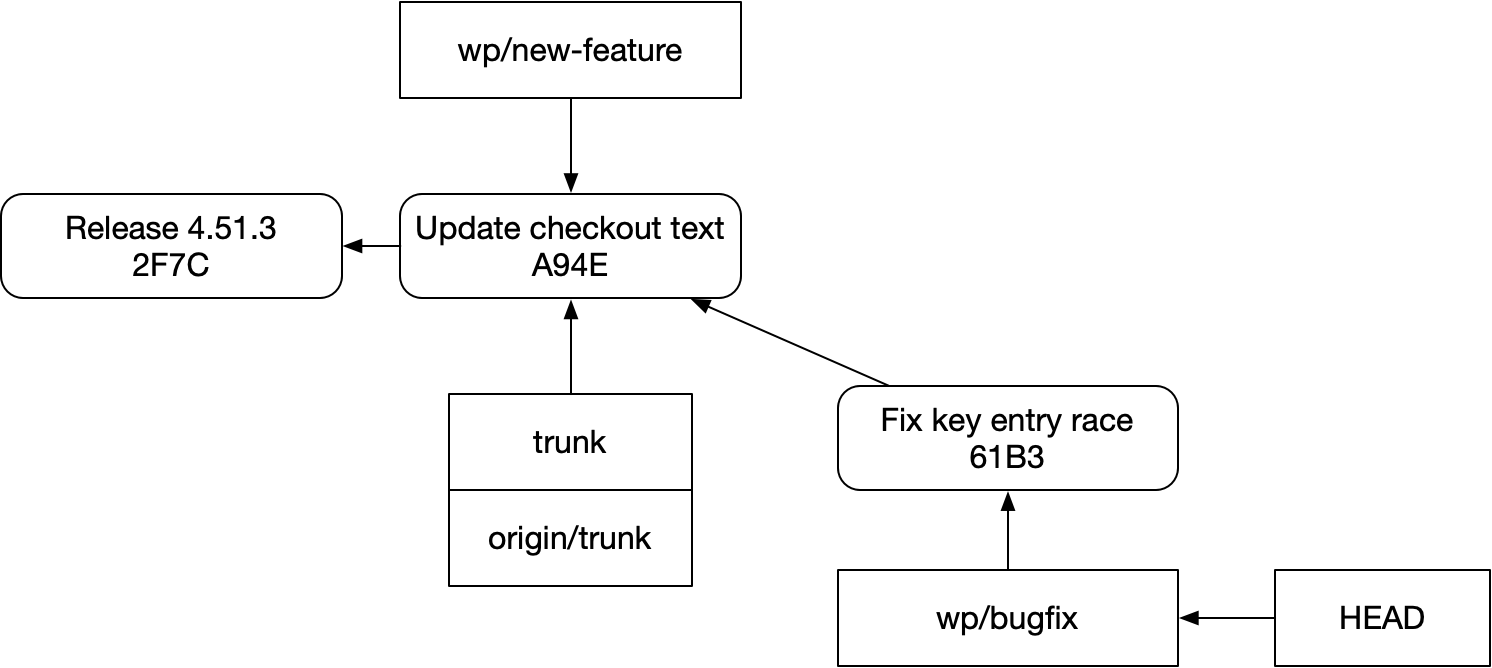
You go ahead submit a PR with the fix to your team’s repo.
Having done that, you switch back to your feature branch:
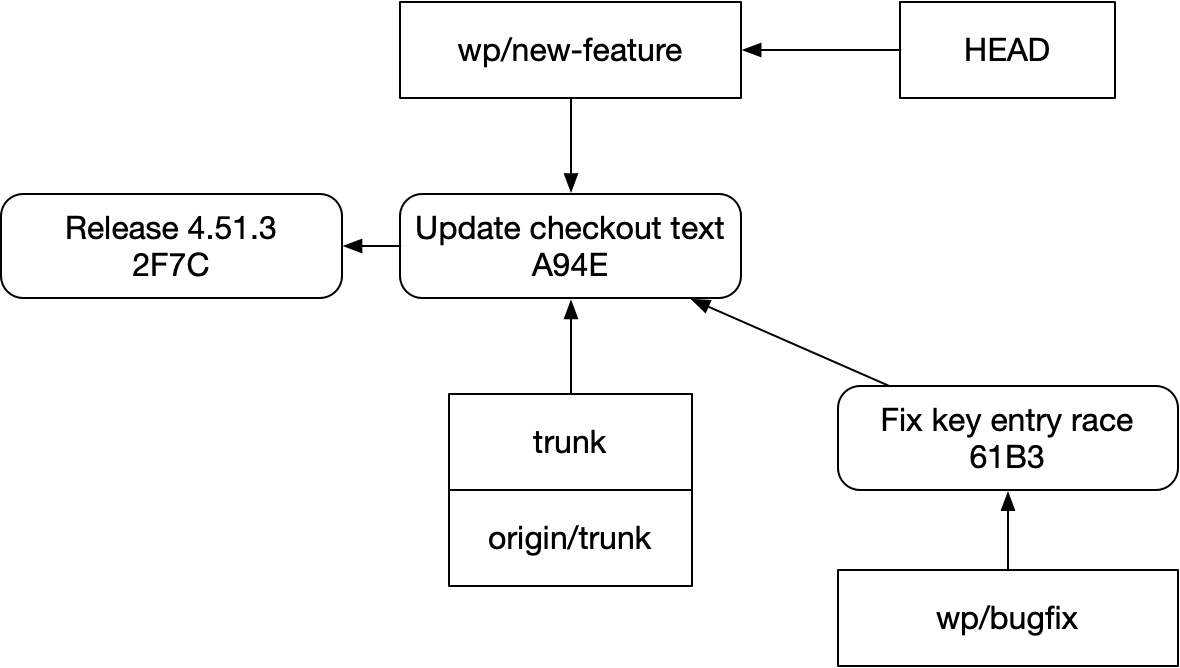
So what do you do now? It’s an annoying bug, so you want it in your file system while you’re building. But it’s not actually blocking: if review is held up for the bugfix, the new feature can be merged without issue.
With git, your options are:
- Rebase
new-featureontobugfix, even though they aren’t dependent on one another, and push through the review - Rebase
new-featureontobugfixwhile developing, and then undo the rebase before you submit the branches
What you can’t do is say, “My editing workspace should have all the code from the bugfix, plus any code I’ve already committed for the new feature.” Like this:
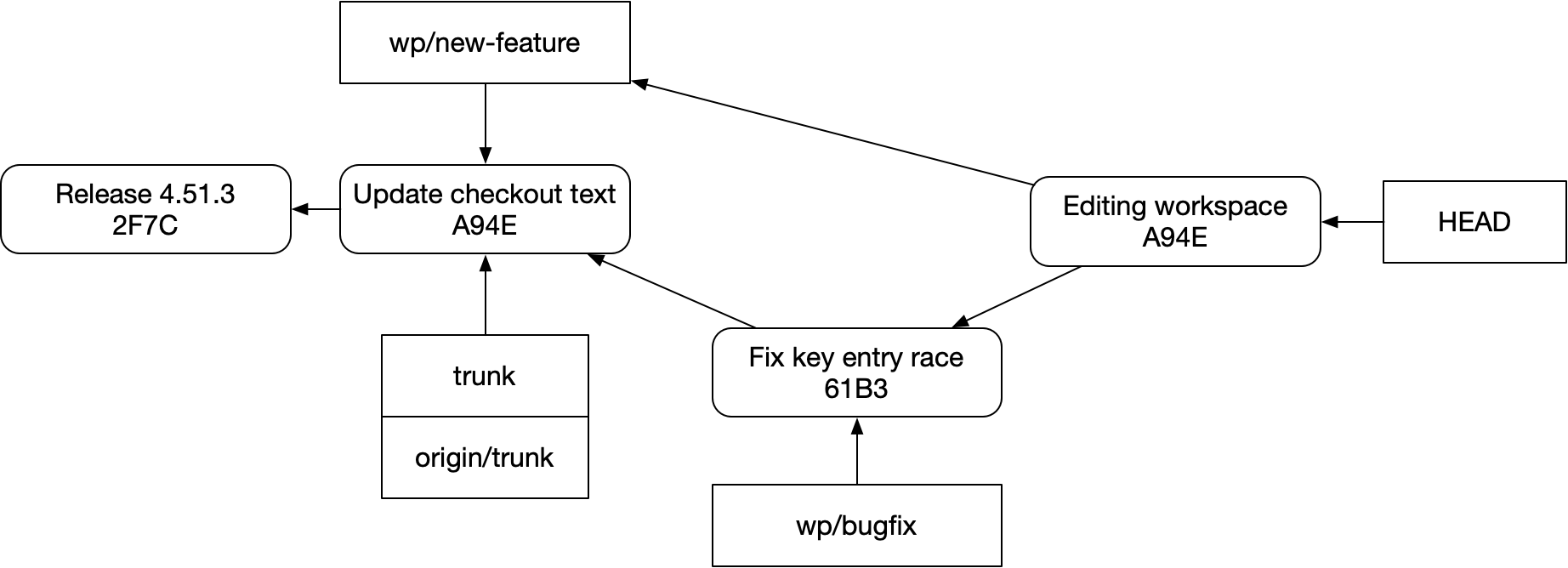
You might say “That’s pointless!” But this does happen, and harder problems than this have the same shape. (E.g. testing for compatibility with unmerged PRs) You might say, “That’s nuts!” But it’s definitely not: with the right tooling, it’s not hard to do your development in a way that lets all your PRs stay parallel in flight, while still being available together in your editing space. And it’s nice!
Git Is No Longer Good Enough
Things today aren’t as dire as they were in the early 2000s. The failings of pre-git VCS tools were pretty obvious. VCS tools were very hit or miss, and often a pain to use and to administer. Everyone agreed that Subversion was a pain; those who could afford to used other tools instead, and even then they had their complaints.
Today, nobody’s complaining about administering their git repo. But back then, nobody was clamoring to have a copy of the whole repo locally. Most people thought branch management could be easier, but certainly weren’t asking to create branches on their local machine. Lots of folks were annoyed by file locking, but plenty of people viewed it as necessary and could not imagine using a VCS that didn’t support it.
This wasn’t everyone. For some folks, particularly in open source, seeing a DVCS for the first time was like seeing the bandage for a wound that had been bleeding for a long, long time.
I think that’s where we are today. For people whose workflows are meaningfully distributed, git’s backward-facing, immutable history model is a recurring source of problems. As a result, git has been behind the state of the art for an embarrassingly long time now. Companies like Meta have enjoyed in-house systems that run circles around it for almost a decade.
And while I hear many people say, “Oh, I don’t touch git anymore. Claude does that for me,” I’m skeptical that this makes these solutions irrelevant. If anything, it seems like engineers are doing more asynchronous development, even on a single machine, with LLMs than they were before.
If you’re someone who already feels the pain I’ve described here, well — I hope you enjoyed the post and find it useful. Like and subscribe, etc. But if you’re not, if you think that your tools are fine, all of this is just to say that I think you might be standing out in the rain. And that it’s nice inside. Come in!